With this communication adapter, you can write files to a local folder. You may also write the file to a network folder, using UNC addressing.
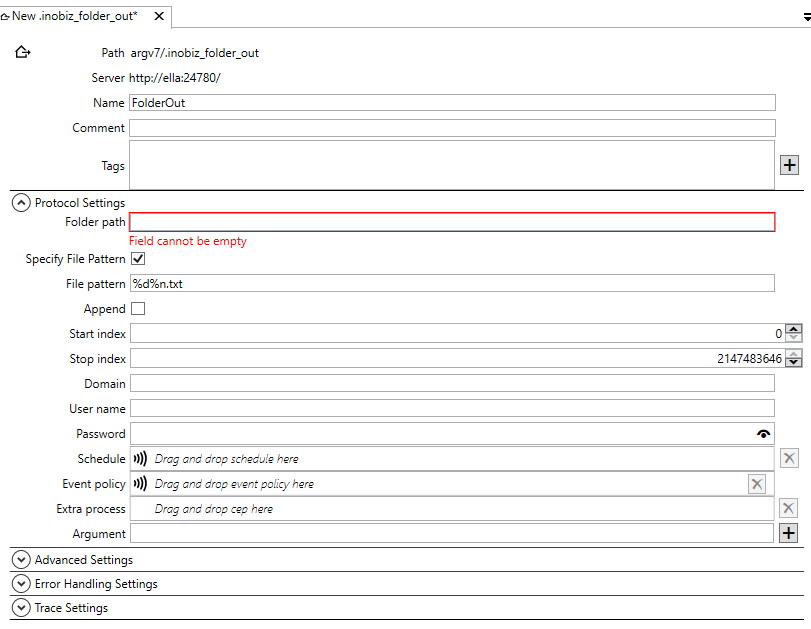
Name
Name of the adapter and the filename of the adapter then it saved.
Comment
Optional comment about the adapter.
Tags
Tags that's are searchable from the files view.
Folder Path
Enter the path to the folder (directory) in which you want the output definition to write its files.
File pattern
Here you specify the name of the file. You can use this file patterns:
|
Format code |
Format |
Example pattern |
Example file name |
|
|
|
|
|
%d |
Date (CCYYMMDD) |
ND%d.txt |
ND20041224.txt |
%n |
Sequence number, incremented by one.Depends on Number start index value and Number max index value. |
File-%n.edi |
File-1.edi , next file will be named File-2.edi |
%u |
Date without century (YYMMDD) |
Ext_%u.txt |
Ext_011224.txt |
%t |
Time (hhmmss)) |
File-%t.inh |
File-124233.inh |
%h |
Hour (hh) |
|
|
%m |
Minute (mm) |
|
|
%s |
Second (ss) |
|
|
%y |
Year with century (CCYY) |
|
|
%Y |
Year without century (YY) |
|
|
%M |
Month (MM) |
|
|
%D |
Day (DD) |
|
|
%i |
transaction-id |
File-%i.inh |
File-4753aefd-02a1-11ed-b935-00155d922b04.inh |
Append
If this check-box is selected, files in the output folder will not be overwritten if a new file, with the same name, is added to the folder. The new file will be appended to the old one.
Start index - Stop index
Define the interval from which the auto-generated number in your file name pattern has to be taken.
Log in with another account
To use another account for this adapter fill in Domain, User name and Password. If its possible add ibzis.exe to have right to read from folder instead of using this settings.
Domain
Domain to log in on.
User name
User name of the account.
Password
Password for the account.
Schedule
Drag and drop a schedule for the adapter. If no schedule is there the adapter is event driven.
Event policy
Drag and drop a event policy if you don't want to use the default policy.
Extra process
Drag and drop a cep holder here. More info about extra process.
Arguments
Arguments for the extra process.
Advanced Settings
Error Handling Settings
Trace Settings
0 Comments