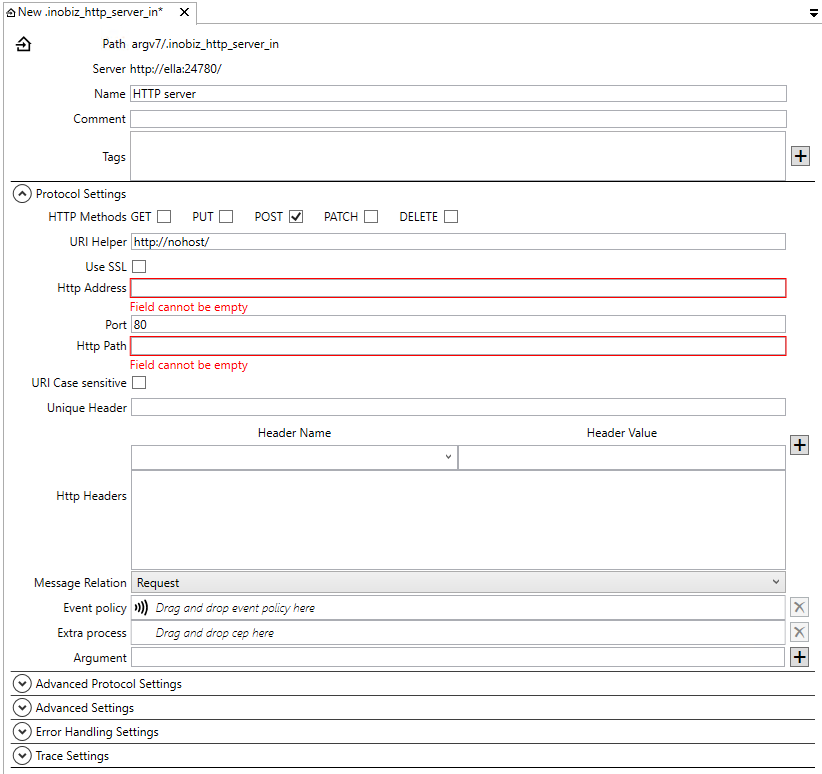
Methods
To limit which HTTP commands the server supports check box corresponding to the command to support.
Use SSL
Check this to enable SSL for this adapter. Remember to select at certificate.
HTTP Address
Hostname or IP address are look like this: example.com or this: 127.0.0.1. Host name can be also be the name for an IP on the lan network. Used to specify which out of several IP addresses or host names the server should exclusively listen to.
Port
Default value 80 is standard port for regular http protocol. An uri is written like this www.exampel.com/index.html does implicitly suggest this address http://www.exampel.com:80/index.html, where 80 denotes the port of the server. To see other standard port see http://en.wikipedia.org/wiki/List_of_TCP_and_UDP_port_numbers
HTTP Path
This example uri https://www.example.com:443/base/top has /base/top as address extension.
This example uri http://www.example.com/base/top/default.html has /base/top/default.html as address extension.
Case sensitive
Check this to make the Http server case sensitive when parsing the address extension.

Certificate and Private Key
Make sure that the certificate is complete with private key.
Basic authentication
To use basic authentication add Auth username and Auth Password.
Unique Header
HTTP Headers
Event policy
Drag and drop a event policy if you don't want to use the default policy.
Extra process
Drag and drop a cep holder here. More info about extra process.
Arguments
Arguments for the extra process.
Advanced Settings
Error Handling Settings
Trace Settings
0 Comments