This communication adapter is only for use with mappings that fetch information from an SQL database it uses the ODBC connection.
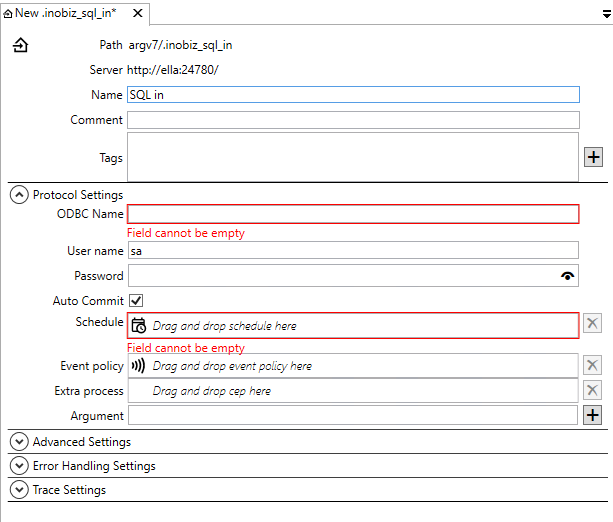
ODBC Name
Select the ODBC from which you want the integration to fetch its data. IS 5 uses ODBC 64bit. If you use a legacy DLL from version 4 then the server use ODBC 32 in that Integration.
User & Password
Enter the user name for the ODBC source that you chose above and enter the password for the same data source. (“sa” is just an example but is often used as a default value).
Auto Commit
If you leave this box unchecked, the mapping will use the SQL option NOAUTOCOMMIT. This means that the programmer has to issue explicitly a COMMIT SQL statement, after an INSERT, DELETE or an UPDATE, as needed. Put in another way, this means that the mapping will not approve the read statements until all defined statements are approved, committing them as a group. If you check this box, the AUTOCOMMIT mode is selected, and the database system executes a COMMIT after each SQL statement. For further information, see EDI-C programming language help, SQL statements, Transaction handling.
Schedule
Drag and drop a schedule for the adapter.
Event policy
Drag and drop a event policy if you don't want to use the default policy.
Extra process
Drag and drop a cep holder here. More info about extra process.
Arguments
Arguments for the extra process.
0 Comments