Email in uses Pop3 to get emails to Integration Server.
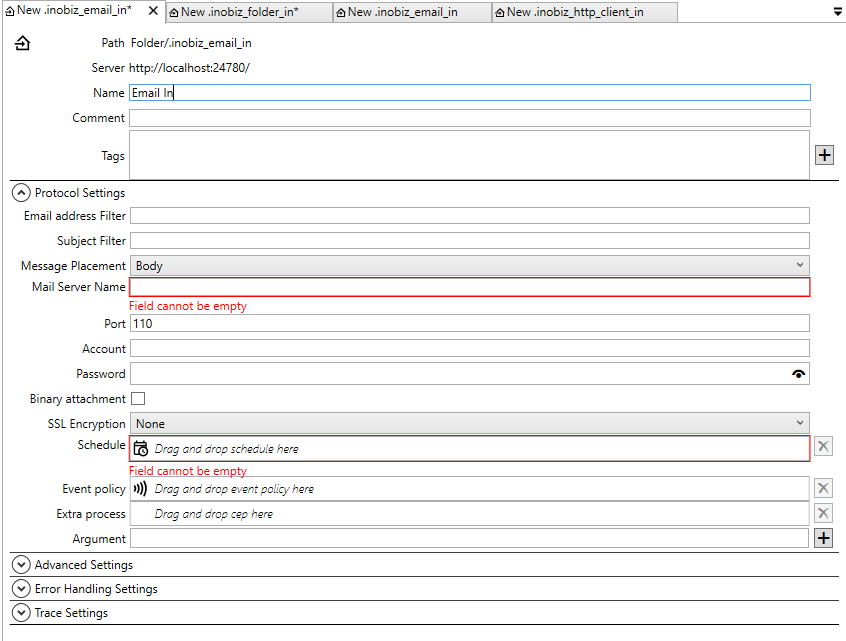
Email address filter
Receive only email(s) from the following address, leave blank to receive all emails.
Subject Filter
Receive only email(s) that match subject, leave blank to ignore subject matching.
Message Placement
Body: The incoming message is in the mail body.
Attachment: One or more incoming messages are placed as attachment(s).
Mail server name
The mail server name or IP address.
Port
Default value 110 is standard port for regular Email Servers. To see other standard port see http://en.wikipedia.org/wiki/List_of_TCP_and_UDP_port_numbers
Account
The Account to log in on the mail server
Password
The password to the account.
Binary file attachment
Mark this checkbox if one or more messages are attachment8s) and their format is binary.
Schedule
Drag and drop a schedule for the adapter.
Event policy
Drag and drop a event policy if you don't want to use the default policy.
Extra process
Drag and drop a cep holder here. More info about extra process.
Arguments
Arguments for the extra process.
Advanced Settings
Error Handling Settings
Trace Settings
0 Comments