The FTP Client input definition uses the FTP protocol to fetch files from a FTP-server. FTP client also supports SSL for secure FTP connection and file transfers.
Here is how to setup the settings for the FTP Client:
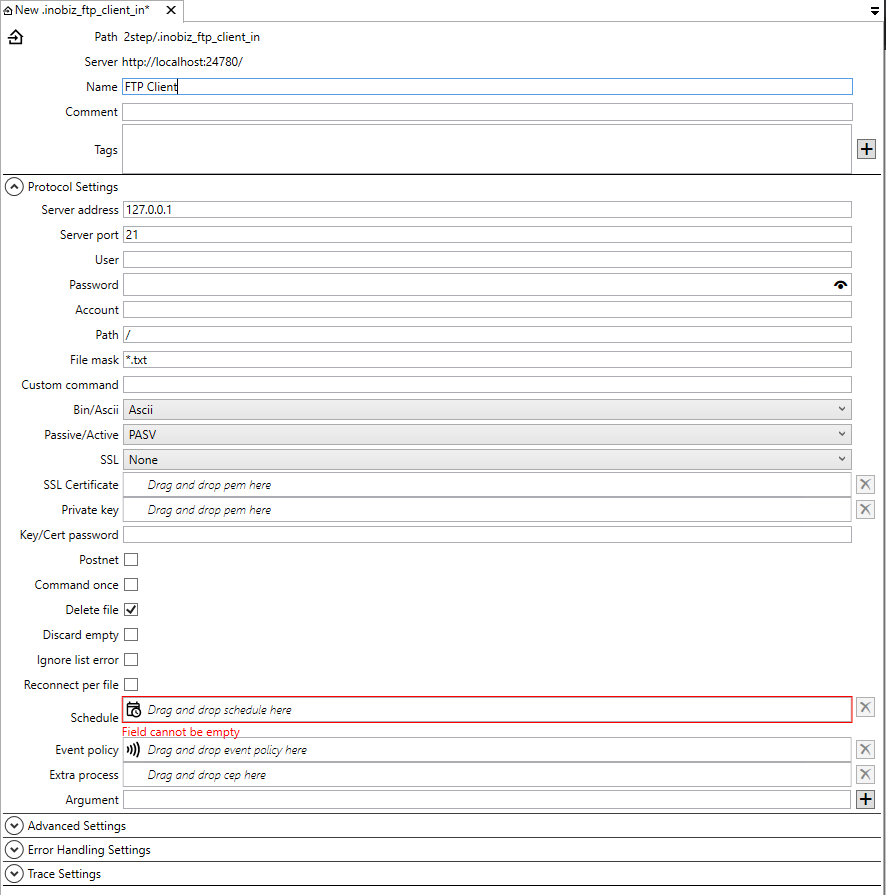
Name
Name of the adapter and the filename of the adapter then it saved.
Comment
Optional comment about the adapter.
Tags
Tags that's are searchable from the files view.
Server address
Specify the address to the FTP-Server either using host name (e.g. ftp.sunet.se) or IP address (e.g. 192.123.23.1). For using SFTP start with the address with sftp:// (e.g. sftp://192.123.23.1).
Server Port
Select the port on your computer that you want to use for this FTP-communication. Usually FTP-servers receive connections on port 21 and 22 for sftp.
User & Password
Enter the user and the password for gaining access to the FTP-server.
Path
In this field you specify the directory on the remote FTP-server from where you want to fetch your input files.
File mask
This field is used for specifying how to filter files that are stored in the remote FTP-server directory. By doing this you only allow files matching the, in the field, defined pattern to be processed. The file mask may include wildcard characters (e.g. * or ?). You can for instance have file masks like: *abc*.txt only allowing files with filenames that include <characters>“abc”<characters> and are of the .txt type.
Custom command
It is possible to send a custom ftp-command with the ftp input adapter. The command will be put into the command sequence for fetching files. There are two places in the command sequence that is supported by the adapter. Either the custom command is run once just before the first attempt to fetch files after an adapter has been started or restarted. The the other alternative is to execute the custom command before each file is downloaded. The adapter can not be configured with both alternativs at the same time. Multiple commands are not supported either. Contact Inobiz to get help to get around any issue these limitations might cause.
This is how to use it:
Put the command between two hash characters, preceded the command with the word ONCE followed by colon character.

In the example above we send the command "LITERAL SITE RDW" by setting the File mask to :
#ONCE:LITERAL SITE RDW#*.edi
If we need this command to be run before each file is downloaded it would be:
#LITERAL SITE RDW#*.edi
The actual filemask begins after the ending # character, in this example *.edi
Bin/Ascii
If you are fetching ASCII files select ASCII. This is the default setting. If you want to fetch binary files, select the Binary alternative.
Passive/Active
This option determines if the FTP-connection should be in Passive or in Active mode. The default setting is Passive mode because this often is the most "firewall friendly" option. Firewalls often restrict incoming connections, while allowing outgoing connections.
SSL
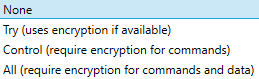
SSL Certificate
If using a SLL Certificate, drag and drop it from the files list.
Private Key
If using a Private Key, drag and drop it from the files list.
Key/Cert password
Password for Certificate.
Postnet
For using Postnet ftp connection.
Command once
Delete file
If this alternative is marked, the files at the FTP-server are deleted on the remote server after they have been retrieved.
Discard empty
Discards empty files on the FTP-server.
Ignore list error
Ignores errors if then the FTP client get a list error from the FTPserver.
Reconnect per file
Reconnects for every file that the FTP client downloads.
Schedule
Drag and drop a schedule for the adapter.
Event policy
Drag and drop a event policy if you don't want to use the default policy.
Extra process
Drag and drop a cep holder here. More info about extra process.
Arguments
Arguments for the extra process.
Advanced Settings
Error Handling Settings
Trace Settings
0 Comments