Undo / Redo
It's hard to show this with a screenshot, but any changes to a mapping can now be Undone, and Redone. We've removed "Are you sure?" boxes, as almost any mistake is trivially recoverable. And for those mistakes like deleting your mapping, we have the next feature...
Readable XML based format - source control friendly.
This means that edits to mappings can be stored in source control as just those edits, rather than the whole mapping. ie:
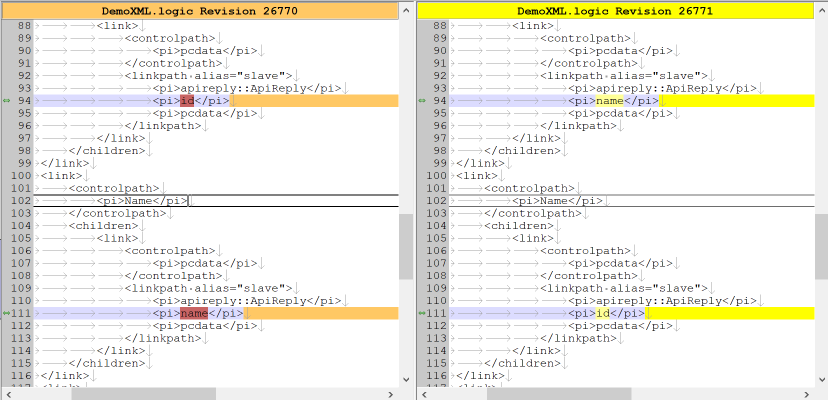
Here we have swapped links from ApiReply.id.pcdata and ApiReply.name.pcdata.
Storing just changes allows for merging, fine grained problem tracking, and better auditing.
Data trees stored as schemas, rather than expanded trees.
Previously, all of a map tree was stored in the actual mapping file (.eds). If you wanted to work on an EDIFACT message, or a UBL schema, they were imported into the mapping, and expanded into the full XML tree. That gave problems on some schemas, as they had lots of repeating sections, and in some cases they could potentially expand infinitely.
We have switched to keeping data tree definitions as schemas rather than "exploded" trees. This is more memory and disk space efficient. Another big advantage is that mappings can share schemas between themselves. To update many mappings, you just need to update the common schema and the mappings will automatically use it. (You still have to compile that mapping into a CEP).
Because data trees are stored separately, then can be shared between mappings, allowing for easy updating of multiple mappings.
Mappings can have multiple trees on source and target sides - including the same data tree on both sides, allowing for reprocessing of data.
It used to be that you could have two trees - a source tree and a target tree. You could not have trees with the same names on the left and right (with some exceptions). You could not have EDIFACT on both sides. (You could have EDIFACT -> Flat (edifact style).
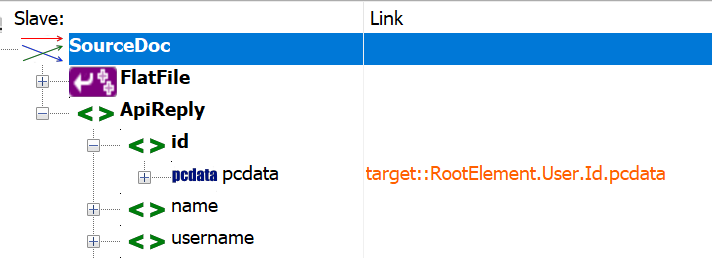
We have introduced a new concept, of EDI-C namespace. You may have noticed in the above picture that the link is pointing to the target namespace. Don't worry - we've left room for xml namepaces too!
Each EDI-C namespace is the root of data tree. This means that you can have EDIFACT to EDIFACT mappings. As the schemas (defx files in this case) are stored separately, you can map D92A-INVOIC to D96-INVOIC if you wish to. More sensibly, INVOIC to PAYMNT.
As you can also have more than one tree/namespace on each side, you can include a namespace on both sides... and as they have the same namespace, they are actually the same tree. This allows for (eg) mapping from an input file to a REST query packet. Then later in the mapping you can map from the query and reply packets at the same time. Or do a simple multistage mapping by having intermediate data on both sides.
Modeless map properties.
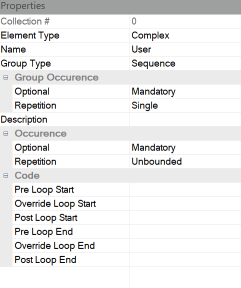
Rather than popping up a dialog box to edit map tree item properties, we've put them into a new imaginatively named Properties pane. Here you can edit names, types, etc. Pretty much everything you'd get in a schema. You can also add map logic
More overriding of code options, including "pre loop start", "post loop start", allowing for more fine tuned customisation.
The schema are now stored separately - and the map logic has also been redone, in XML logic files. The above screenshot shows properties for a loopable map item. You could always override auto-generated code for data items, but now you can override loops too. You can also add code before / after the start and finish of loops, allowing for prologs, or custom break conditions, while still keeping the normal generated loop code.
REST queries addable to mappings, without writing custom code.
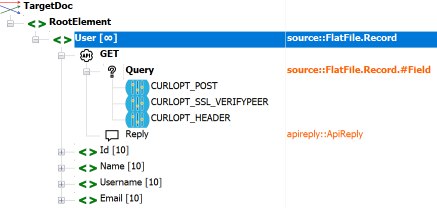
You've always been able to add custom code to mappings, though the name has changed over the years. Now you can have custom code anywhere on the control side of your mapping. You can have code nodes, code folders, and they are loopable. (Previously they were not, as they were "records with repetition=0".
As you can add in custom code, we added some specialisations... And the first of which is REST query, made up of:
- A GET folder holding variable settings.
- A Query node where you assemble the URL you're querying, allowing for a query to include information mapped from the other side.
- Additional cURL parameters
- A reply node, where the reply from the REST query is mapped to a data tree on the other side, and parsed so you can then map from the parsed reply.
The last point is quite radical, as you can map from a target node to a source node. The Reply node will query its target for its type (in this case JSON) and build code to parse it.
SQL queries addable into non-SQL mappings, without writing custom code.
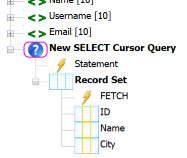
Another specialisation of "custom folder/code" is an SQL query. Here we have added a CURSOR SELECT into a Flat->XML mapping. You can also add DELETE, INSERT, UPDATE and Stored Procedures. You can also add pretty much any SQL code into code box and have it in your mapping. (Please see Exploits of a Mom for a lesson in what not to have in your mapping).
We no longer have SQL mappings, they are simply "nothing->xml mappings with a lot of SQL custom nodes".
Any mapping can be a push mapping, or a pull mapping.
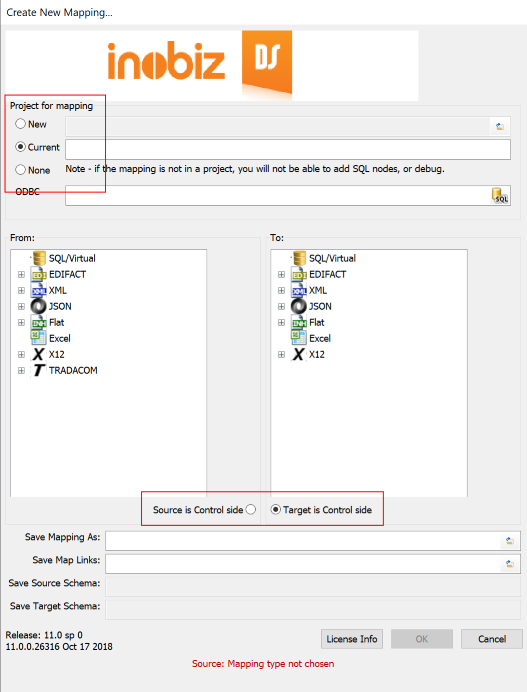
As map logic is now separated from the data definitions, any mapping can be controlled from either side. You can have EDIFACT to XML with SQL embedded into the EDIFACT side if you like. It really depends on what maps the map simpler to understand rather than technical needs.
Mappings independent of test settings.
In the above image we've also highlighted that new mappings should be put into a project. Test files and settings are no longer stored in the mapping, but only in the project. The project also holds ODBC settings used when building the mapping so you can auto-populate SQL queries.
0 Comments