In this example we have a HTTP Server that we vote to send a static request to and get a response and after that convert the response in to another system:
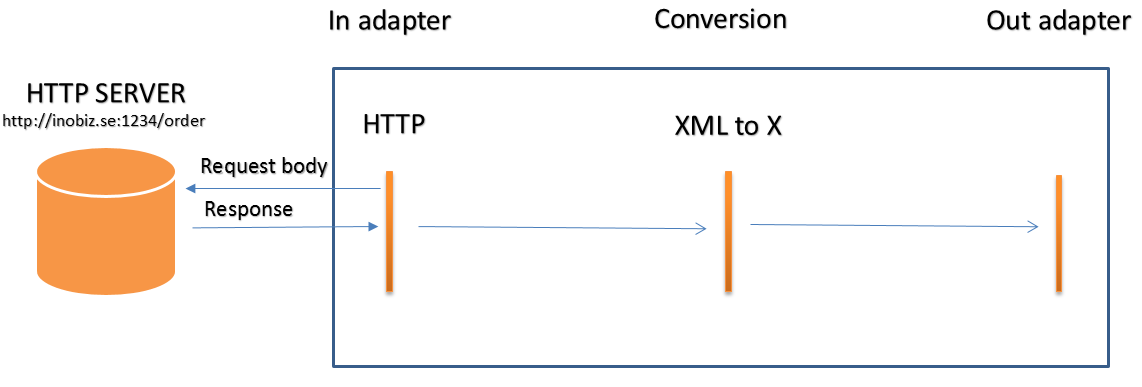
Here is have you set up the HTTP properties in the HTTP inadapter.
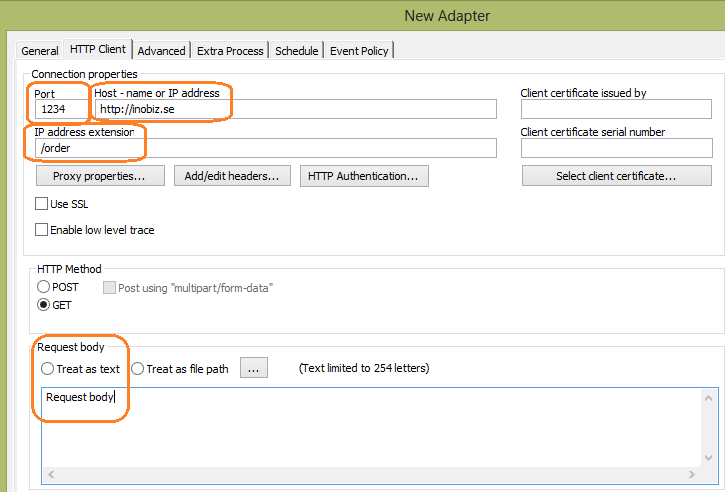
Connection Properties
Port
Enter the desired Port for establishing HTTP communication. The standard port for HTTP is 80, and for HTTPS 443.
Host - Name or IP Address
Specify the address to the HTTP-Server, either using the host name (e.g. ftp.sunet.se) or the IP address (e.g. 192.123.23.1).
IP Address Extension
The text you enter in this field becomes an extension to the IP Address you entered in the Host - Name or IP Address field. For instance, if you enter “customer1” in this field, the URL to this HTTP Server becomes: http://192.168.1.2/customer1.
Proxy Properties
If Proxy settings are appropriate, open the Proxy Settings dialog by clicking the Proxy properties button and entering the details. For more information, see the Proxy Settings section.
Certificate Settings
Selecting a certificate automatically makes the HTTP Client a HTTPS Client. This will only respond to connections that have a valid certificate. Usage of certificates is optional.
To select a certificate, click the Select certificate button and pick the desired certificate from the list that appears (in the list are shown all the installed certificates including information on each one, such as Issued by and Serial number).
Use SSL
Check this box if the remote HTTP server uses SSL Explicit Encryption. Excerpt from DART communication’s help file: "ExplicitNormal: Everything is encrypted after the certificate is sent. This is used by many vendors."
Method
Here you can specify if the message is to be sent using the POST or the GET method. The default value is POST. We strongly recommend that you use the POST method. If you use the GET method you can specify if the message should be in the Query string field of the HTTP head or not.
Advanced Header Options
Advanced header options let you modify and add headers that will be included in the HTTP request, see HTTP header properties.
0 Comments