This communication adapter sends files to a HTTP (or HTTPS) server. The (S) stands for Secure and enables you to use certificates to ensure secure communication.
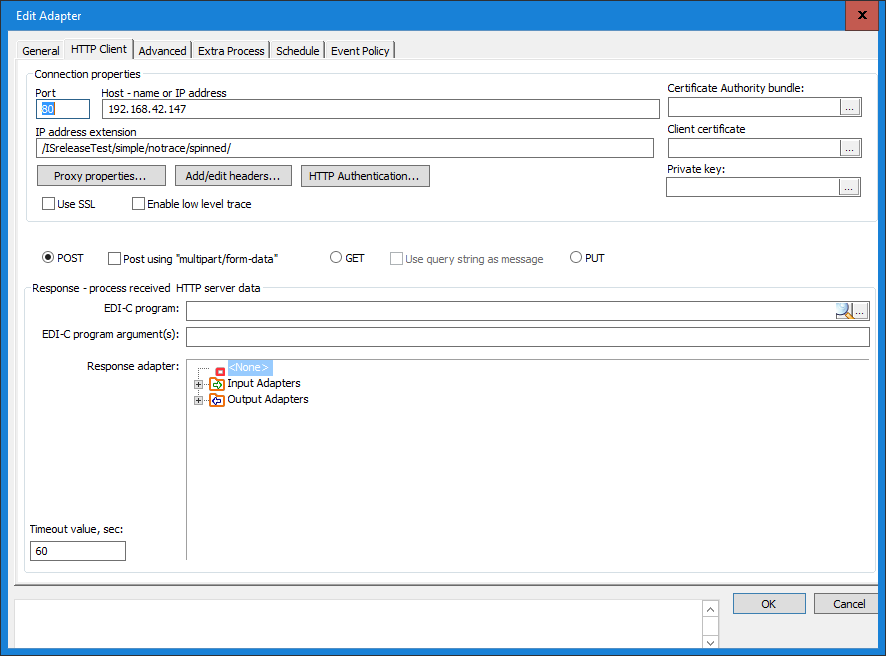
Connection Properties
Port
Enter the desired Port for establishing HTTP communication. The standard port for HTTP is 80, and for HTTPS 443.
Host - Name or IP Address
Specify the address to the HTTP-Server, either using the host name (e.g. ftp.sunet.se) or the IP address (e.g. 192.123.23.1).
IP Address Extension
The text you enter in this field becomes an extension to the IP Address you entered in the Host - Name or IP Address field. For instance, if you enter “customer1” in this field, the URL to this HTTP Server becomes: http://192.168.1.2/customer1.
Certificate Settings
Selecting a certificate automatically makes the HTTP Client a HTTPS Client. This will only respond to connections that have a valid certificate. Usage of certificates is optional.
Low Level Trace
This check box enables the trace function in the http component. The trace filename is HTTP_out_dart_trace_X.log where X is the definition ID number. The trace file is created in the .\TraceDir directory.
Use SSL
Check this box if the remote HTTP server uses SSL Explicit Encryption.
Method
Here you can specify if the message is to be sent using the POST or the GET method. The default value is POST.
Header Options
Header options let you modify and add headers that will be included in the HTTP request.

Ignore Response
This option makes the output definition ignore any response the HTTP server may send back.
Forward Response to Input Definition
This option causes the output definition to forward the response from the HTTP server to another input definition. Select the input definition by clicking the Settings button. This opens the following dialog box:
Timeout Value
Defines the maximum time the output definition can wait for the HTTP server’s response, before it raises a Timeout and an error is flagged.
Use EDI‑C Program
This option directs the output definition to retrieve the response from the HTTP server, handle it as defined in the selected EDI‑C program, applying the arguments given in the EDI‑C program argument(s) field.
Exempel of program
integer VerifyResponseAndHeader(string HttpResponseData, string ArgumentFromAdmin, integer boolSuccessfulTransfer, string HttpErrorString, string HttpResponseHeaderData)
{
if(strlen(HttpResponseData) > 5000)
{
EditedResponse = strbegin(HttpResponseData, 5000) & "...(truncated)";
return 12; // Will trigger GetResponseData()
}
if(boolSuccessfulTransfer)
return 0;
}
return 1;
}
string GetResponseData()
{
return EditedResponse;
}
0 Comments