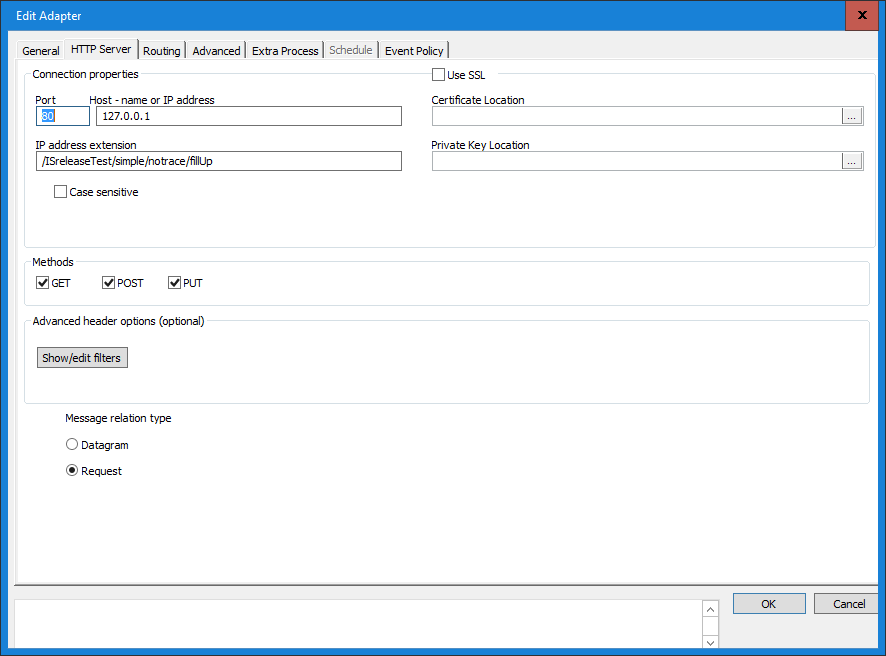
Connection properties
Port
Default value 80 is standard port for regular http protocol. An uri is written like this www.exampel.com/index.html does implicitly suggest this address http://www.exampel.com:80/index.html, where 80 denotes the port of the server. To see other standard port see http://en.wikipedia.org/wiki/List_of_TCP_and_UDP_port_numbers
Host - name or IP address
Hostname or IP address are look like this: example.com or this: 127.0.0.1. Host name can be also be the name for an IP on the lan network. Used to specify which out of several IP addresses or host names the server should exclusively listen to.
IP address extension
This example uri https://www.example.com:443/base/top has /base/top as address extension.
This example uri http://www.example.com/base/top/default.html has /base/top/default.html as address extension.
Case sensitive
Check this to make the Http server case sensitive when parsing the address extension.
Use SSL
Check this to enable SSL for this adapter. Remember to select at certificate.
Select certificate
Make sure that the certificate is complete with private key.
Methods
To limit which HTTP commands the server supports check box corresponding to the command to support. If none is checked adapter wont accept any command.
Advanced header options (optional)
Unique identifier
Type in (or select from list) a header name. Specify a header and the HTTP server will generate a unique value for this header (confirm).
Show/Edit filters
The HTTP server can be configured to only accept HTTP messages with header values specified under this option.
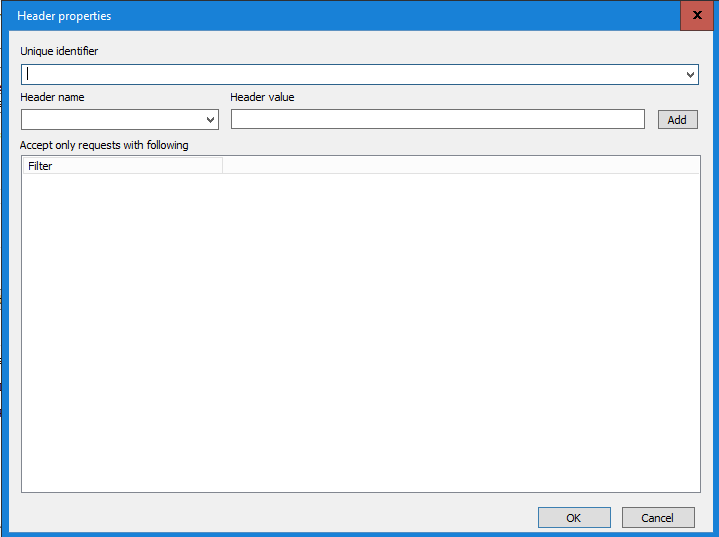
In this window you can configure the HTTP server to only accept incoming requests if they have Content-Type: text/plain.
0 Comments