The FTP Client input definition uses the FTP protocol to fetch files from a FTP-server. Inobiz Integration Server FTP client also supports SSL for secure FTP connection and file transfers.
If you select the FTP Client tab, the following window will appear:
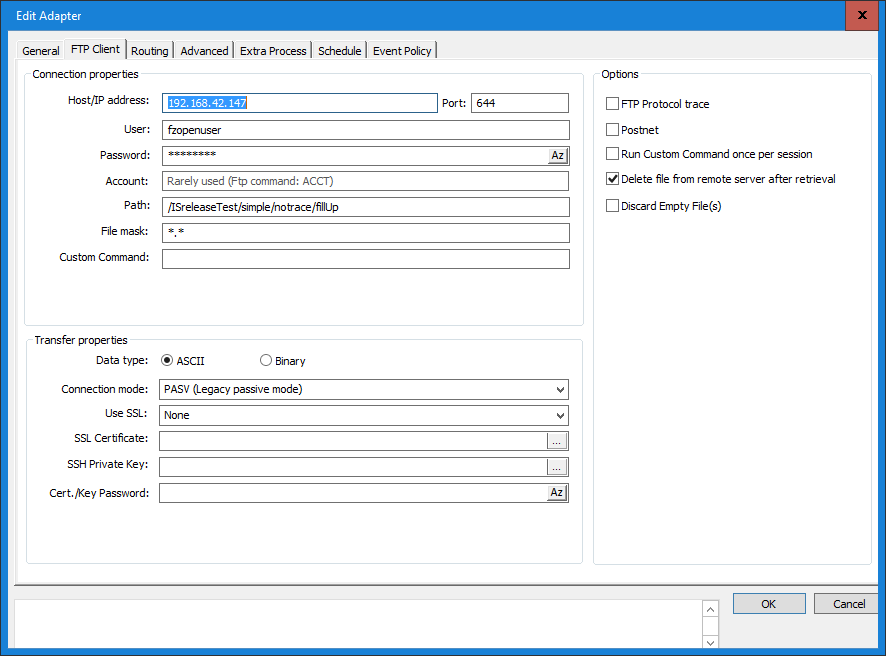
Host - name or IP Address
Specify the address to the FTP-Server either using host name (e.g. ftp.sunet.se) or IP address (e.g. 192.123.23.1).
Port
Select the port on your computer that you want to use for this FTP-communication. Usually FTP-servers receive connections on port 21 (default value).
User & Password
Enter the user and the password for gaining access to the FTP-server, usually provided by the FTP-server administrator.
Path
In this field you specify the directory on the remote FTP-server from where you want to fetch your input files. The remote server might not support the folder delimiter "\" (backslash) in the path string and this might cause an error message.
File mask
This field is used for specifying how to filter files that are stored in the remote FTP-server directory. By doing this you only allow files matching the, in the field, defined pattern to be processed. The file mask may include wildcard characters (e.g. * or ?). You can for instance have file masks like: *abc*.txt only allowing files with filenames that include <characters>“abc”<characters> and are of the .txt type. Note that
wildcard characters are not valid when using Transfer Command: GET - the full filename has to be specified.
Custom command
It is possible to send a custom ftp-command with the ftp input adapter. The command will be put into the command sequence for fetching files. There are two places in the command sequence that is supported by the adapter. Either the custom command is run once just before the first attempt to fetch files after an adapter has been started or restarted. The the other alternative is to execute the custom command before each file is downloaded. The adapter can not be configured with both alternativs at the same time. Multiple commands are not supported either. Contact Inobiz to get help to get around any issue these limitations might cause.
This is how to use it:
Put the command between two hash characters, preceded the command with the word ONCE followed by colon character.

In the example above we send the command "LITERAL SITE RDW" by setting the File mask to :
#ONCE:LITERAL SITE RDW#*.edi
If we need this command to be run before each file is downloaded it would be:
#LITERAL SITE RDW#*.edi
The actual filemask begins after the ending # character, in this example *.edi
Transfer type
If you are fetching ASCII files select ASCII. This is the default setting. If you want to fetch binary files, select the Binary alternative.
Use passive mode
This option determines if the FTP-connection should be in Passive or in Active mode. The default setting is Passive mode because this often is the most "firewall friendly" option. Firewalls often restrict incoming connections, while allowing outgoing connections.
Delete files from remote server after retrieval
If this alternative is marked, the files at the FTP-server are deleted on the remote server after they have been retrieved. Contact the administrator of the FTP-server to be sure, since in some cases, the FTP-server senses when a file is fetched and moves it somewhere else. In other cases you should delete the file after it is fetched.
Enable low level trace
By clicking this check-box, the FTP component will write a low level communication protocol trace. The trace filename is FTP_in_dart_trace_X.logwhere X is the definition ID number. The trace file is created in the .\TraceDir directory.
SSL Explicit encryption
Check this box if the remote FTP server uses FTP with SSL Explicit Encryption. From the DART communications help file: "ExplicitNormal: Everything is encrypted after the certificate is sent. This is used by many vendors."
Error :FTP server. CURLError:19:execute:perform:FTP: couldn't retrieve (RETR failed) the specified file
To avoid this error add this setting under Advanced:
IGNORELISTERROR and value 1

Postnet
This help is written in Swedish because the FTP service described below, is provided by the Swedish Post Office.
Hämtning av meddelande - FTP input definition
För att kunna hämta meddelande så skall följande inställningar göras
Path
Skall vara blank om inte andra direktiv har angivits från Posten
File mask
I File mask lägger du till "facket".
Transfer type
Skall vara ASCII.
Delete file from remote server after retrieval
Skall vara ikryssad.
Use passive mode
Skall inte vara ikryssad eftersom Postens FTP tjänst inte stödjer detta kommando.
Port
Den port som Postens FTP tjänst använder, vanligtvis så är det default porten 21.
Host - name or IP address
Namnet på Postens FTP tjänst server skall skrivas in, detta värde erhålls från Posten. Formatet kan vara t.ex. ftp.edi.posten.se eller edi.postnet.se
User & Password
Fylls i med från Posten erhållna värden.
0 Comments