If you select the General tab, the following window will appear:
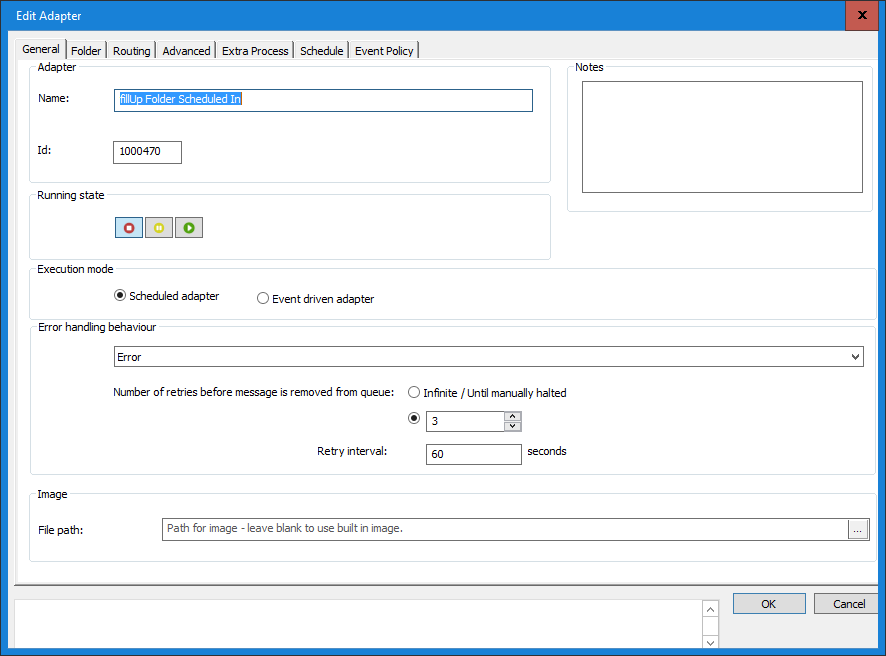
In this window you specify the Input definition name basic settings, such as when the input process is to run and how the definition is to react when an error occurs.
Name
Enter the name you want to identify the definition. The name will appear in both the Administration Program and the Transaction Monitor. Try to pick a descriptive name that will help you remember the definition’s purpose. You may find this helpful in future.
Running State
The Running state indicates the current state of the definition. It also allows you to change the state of the definition. However, there are easier ways of doing this, see section: It is recommended that the state be left with the default value Stop, while the definition is created. In any case, the definition can not be used until it has been integrated into an Integration definition. For more information on how to manage running, see section: 3.2 Start, Stop or Pause Individual Definitions on the Server.
Execution mode
Choose how execution of the Input definition is to be triggered. Selecting the Scheduled adapter, specifies that the input process will start as given under the Schedule tab. Event driven adapter means that the Input definition will start whenever an event occurs (e.g. when new data is placed in the folder from which the definition reads). Note that the FTP Client Communication Method cannot be event driven and the method Receive from Output Definition has to be event driven.
Error handling behaviour
Sets up the actions the Input definition is to take when an error occurs in the input process.

Error
Allows the input adapter to retry fetching the data, for as many times as specified in Number of retries ...., in the hope that there will be an improvement in the location (or connection). Specify the number times the adapter can try to process a message, before the adapter is disabled in Retry Interval.
Discard message (no error)
The data will be removed and no error message will be issued.
Number of retries
Specify the number of times the adapter can try to process a message, before the adapter is disabled
Retry Interval
Define the time interval between the retry attempts. This is to allow time for the sending location to be modified, before the Intput definition tries to send again.
Notes
In this field, you can enter notes to help you remember, for example, why the settings were made and those cases for which the definition is valid.
0 Comments