If you select the Email tab, the following window will appear:
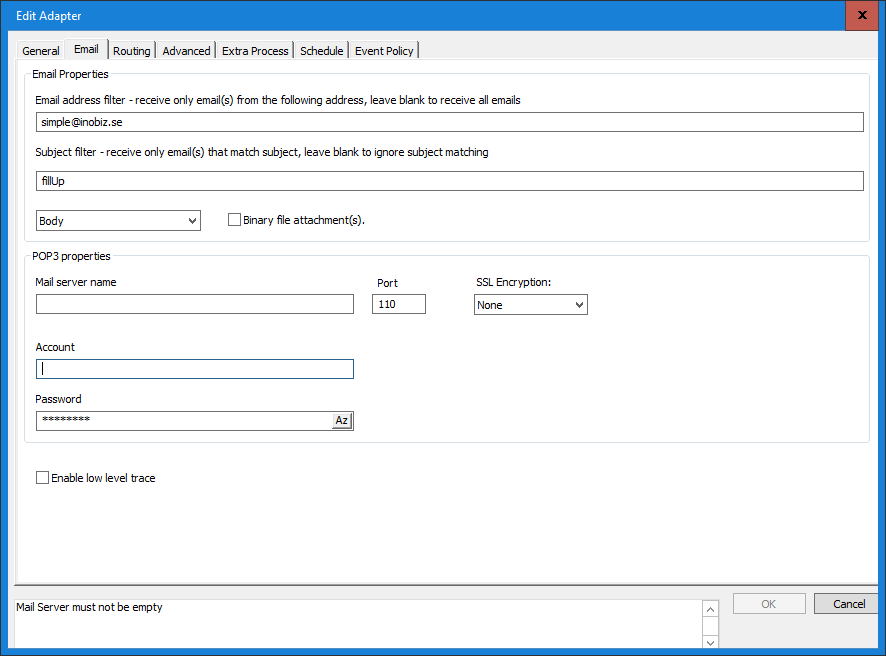
Properties
Email address filter
Receive only email(s) from the following address, leave blank to receive all emails.
Subject Filter
Receive only email(s) that match subject, leave blank to ignore subject matching.
The message is placed in the body
The incoming message is in the mail body
The message is placed as an attachment(s)
One or more incoming messages are placed as attachment(s)
Binary file attachment(s)
Mark this checkbox if one or more messages are attachment8s) and their format is binary.
POP3 properties
Port
Default value 110 is standard port for regular Email Servers. To see other standard port see http://en.wikipedia.org/wiki/List_of_TCP_and_UDP_port_numbers
Mail server name
The mail server name or IP address.
Account
The Account to log in on the mail server
Password
The password to the account.
Enable low level trace
Activates the email-adapter's low level trace. Two traces will be activated, both the Integration Server's Email-adapter EDI-C trace and the communications protocol internal low level trace.
0 Comments