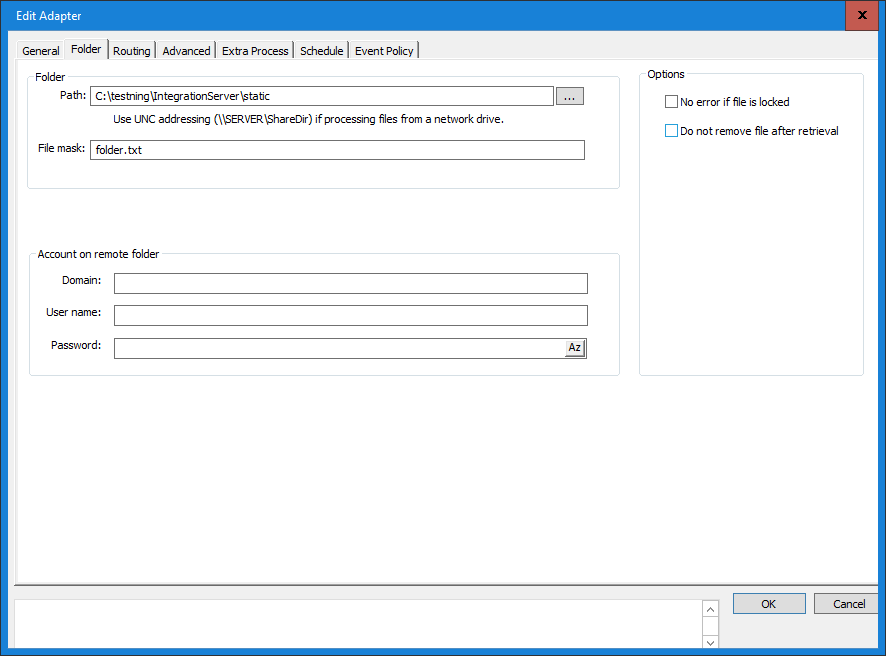
With this communication adapter you can read files from a local or network folder using UNC addressing. When a file is found and read successfully the file is deleted from its origin folder.
In the Folder tab you make the following settings:
Path
Enter the path to the folder (directory) from which the integration should process files. If easier use the browse button to locate the wanted input folder. Note that the Inobiz Integration Server does not support mapped network drives using drive letters e.g.G: If input is from a shared network drive then UNC addressing (\\SERVER\ShareName) has to be used.
Filter
You can filter files that are processed from the folder by using a file mask. By doing this you only allow files matching the defined pattern to be processed. The file mask may include wildcard characters (e.g. * or ?).
Example: A file mask like: *abc*.txt, specify files that contain abc in the file name and have .txt as file name suffix.
Error
Tick this box if you do not want errors raised when the program is trying to process a locked file.
Note
Application that put files in the input folder, based on events, must not release the file before it has completed the write, otherwise the integration may fetch the file before completion and only get part of the message.
Folders located on a remote network are not recommended to be event based. This kind of setup will normally fetch the files but result in bad performance. This is because Integration Server uses a Microsoft function named FindFirstChangeNotification() that can not be guaranteed to work on a remote folder.
Furthermore can the FindFirstChangeNotification() function be denied with an error code 56 ("The network BIOS command limit has been reached"). This error can occur when using remote desktop or when using many remote event based folders. See Microsoft Knowledge Base articles 271148 and 232476 for more details.
0 Comments